Hello,
I am the developer of https://tracker.wildkat.net/
It is a clean design of the bittorrent tracker protocol in udp/http. It is written in python3. It is a tracker and a private or open server. It is all self contained.
If configured it is a full fledged torrent web site plus tracker with automatic ingestion of torrents.
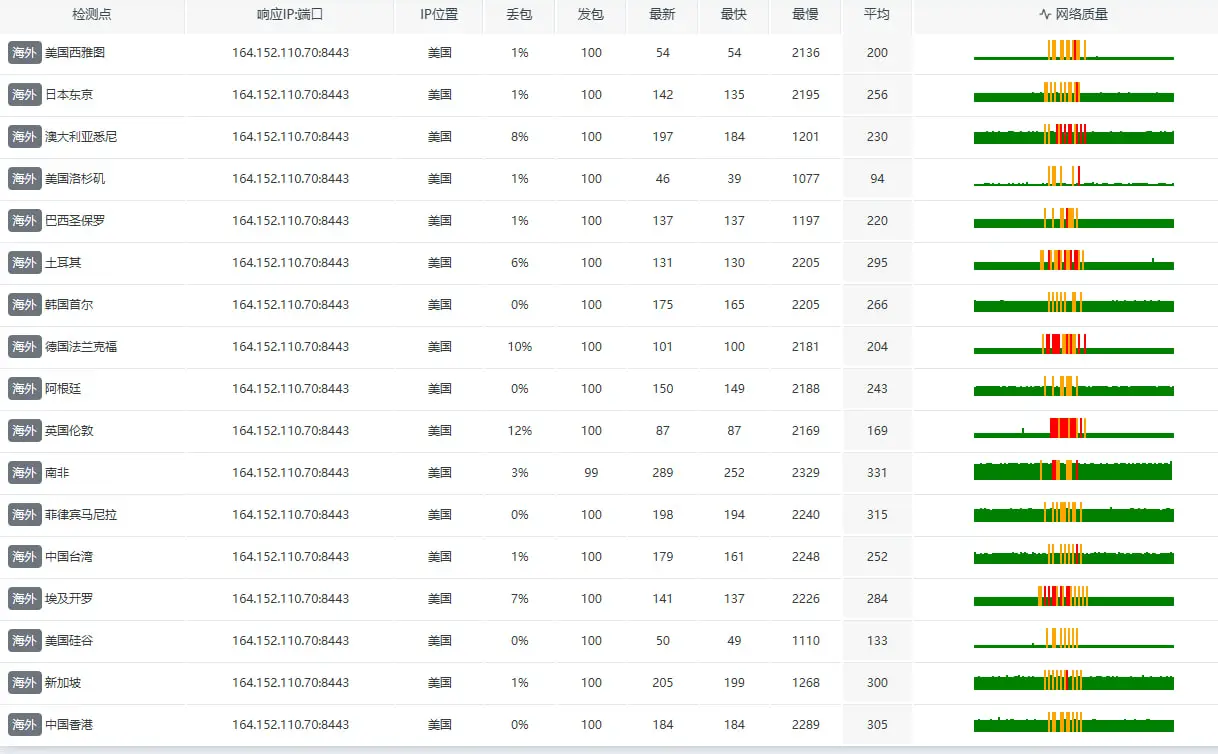
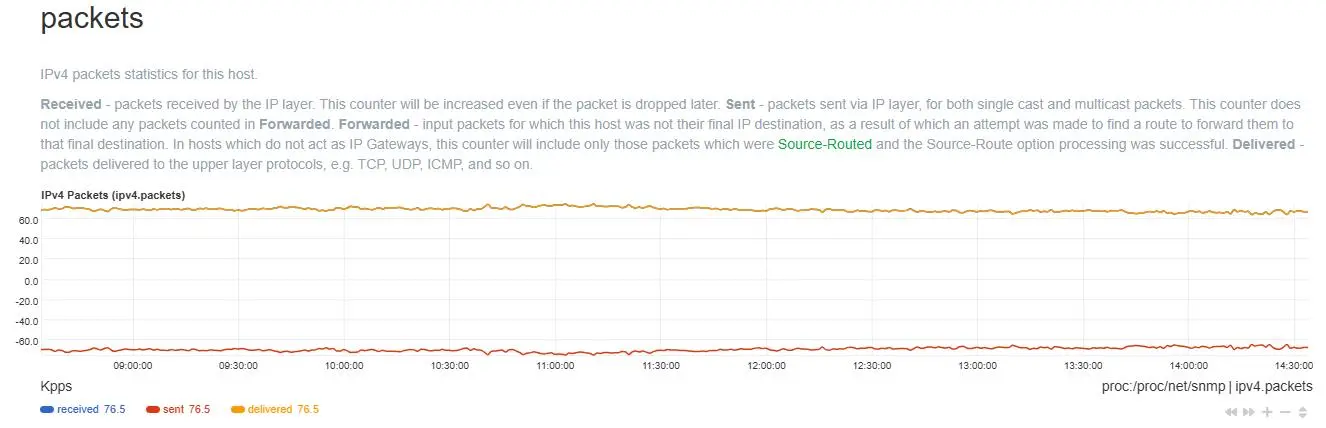
Once the server was however accepted by ngosang the load doubled from tracking about 120k torrents to 350k torrents. In this new scenario many UDP packets cannot be processed. The server receive them. The cpu is fine. The design of software cannot keep up.
If I do workload scenario on my macbook pro is fine. I cannot stress system whatsoever and always works great, hooray! However in hosted VM this is not the case.
I have tried a few different redesign over last couple days to address the traffic and accept more, but nothing really matters. I have recently did a redesign to use UDP_REUSEPORT, but it also just comes with a lot more problems as well as the overall design wasn't written for this. Performance also did not seem to improve as much as one would anticipate.
Poke around the web site and let me know if you would be interesting in doing some collaboration work on my project. It is on github but marked private at the moment.
wc -l tracker_server.py
41939 tracker_server.py
It is a large monolith of code presently.
This could be an OCI limitation even, I don't know. I don't think so though as my bandwidth and cpu are just fine. I think its just the design and workers stalling and queuing up.
The alternative is doing nothing and it runs as is serving half the traffic it receives.
The opentrackr number you report from victorarle I find hard to believe is a true number to be honest. I should be receiving the same level of traffic and actually more because the tracker is on another more chinese based list as well.
Over 60 secs only 672 packets per second were being processed. 75k connections per second would be an absolute insane amount to the realm of about 150,000 packets/sec minimum.
I actively ban abuse traffic like a crazy person as well. I think the numbers would be through the roof if I didn't do banning. I don't know what opentrackr abuse handling is.
I am not implementing UDP_REUSEPORT. I did an attempt but didn't see much improvement and would require a very large refactor to make everything work correctly again. The syncing from udp forks was not good. I think would require a refactor and use redis perhaps to sync data.
Every 1.0s: nstat -az | grep -E 'UdpRcvbufErrors|UdpSndbufErrors' hazen-a1: Tue May 5 18:29:32 2026
UdpRcvbufErrors 2422 0.0
UdpSndbufErrors 0 0.0
Does not increase.
root@hazen-a1:~# pid=$(pgrep -f 'tracker_server.py' | head -n1)
grep 'Max open files' /proc/$pid/limits
ls /proc/$pid/fd | wc -l
Max open files 65536 65536 files
179
Root@hazen-a1:~#
root@hazen-a1:~# sysctl net.netfilter.nf_conntrack_max
sysctl: cannot stat /proc/sys/net/netfilter/nf_conntrack_max: No such file or directory
root@hazen-a1:~# cat /proc/sys/net/netfilter/nf_conntrack_count
cat: /proc/sys/net/netfilter/nf_conntrack_count: No such file or directory
Root@hazen-a1:~#
I think its just this poop cpu. I cannot replicate any sort of performance issue on my personal computer no matter how hard I stress it.
root@hazen-a1:~# cat /proc/cpuinfo
processor   : 0
BogoMIPS    : 50.00
Features    : fp asimd evtstrm aes pmull sha1 sha2 crc32 atomics fphp asimdhp cpuid asimdrdm lrcpc dcpop asimddp
CPU implementer   : 0x41
CPU architecture: 8
CPU variant : 0x3
CPU part    : 0xd0c
CPU revision      : 1
processor   : 1
BogoMIPS    : 50.00
Features    : fp asimd evtstrm aes pmull sha1 sha2 crc32 atomics fphp asimdhp cpuid asimdrdm lrcpc dcpop asimddp
CPU implementer   : 0x41
CPU architecture: 8
CPU variant : 0x3
CPU part    : 0xd0c
CPU revision      : 1
processor   : 2
BogoMIPS    : 50.00
Features    : fp asimd evtstrm aes pmull sha1 sha2 crc32 atomics fphp asimdhp cpuid asimdrdm lrcpc dcpop asimddp
CPU implementer   : 0x41
CPU architecture: 8
CPU variant : 0x3
CPU part    : 0xd0c
CPU revision      : 1
processor   : 3
BogoMIPS    : 50.00
Features    : fp asimd evtstrm aes pmull sha1 sha2 crc32 atomics fphp asimdhp cpuid asimdrdm lrcpc dcpop asimddp
CPU implementer   : 0x41
CPU architecture: 8
CPU variant : 0x3
CPU part    : 0xd0c
CPU revision      : 1
root@hazen-a1:~# lscpu
Architecture: aarch64
CPU op-mode(s): 32-bit, 64-bit
Byte Order: Little Endian
CPU(s): 4
On-line CPU(s) list: 0-3
Vendor ID: ARM
BIOS Vendor ID: QEMU
Model name: Neoverse-N1
BIOS Model name: virt-7.2 CPU @ 2.0GHz
BIOS CPU family: 1
Model: 1
Thread(s) per core: 1
Core(s) per socket: 4
Socket(s): 1
Stepping: r3p1
BogoMIPS: 50.00
Flags: fp asimd evtstrm aes pmull sha1 sha2 crc32 atomics fphp asimdhp cpuid asimdrdm lrcpc dcpop asimddp
NUMA:
NUMA node(s): 1
NUMA node0 CPU(s): 0-3
Vulnerabilities:
Gather data sampling: Not affected
Ghostwrite: Not affected
Indirect target selection: Not affected
Itlb multihit: Not affected
L1tf: Not affected
Mds: Not affected
Meltdown: Not affected
Mmio stale data: Not affected
Old microcode: Not affected
Reg file data sampling: Not affected
Retbleed: Not affected
Spec rstack overflow: Not affected
Spec store bypass: Mitigation; Speculative Store Bypass disabled via prctl
Spectre v1: Mitigation; __user pointer sanitization
Spectre v2: Mitigation; CSV2, BHB
Srbds: Not affected
Tsa: Not affected
Tsx async abort: Not affected
Vmscape: Not affected
root@hazen-a1:~#
No such file or directory就是最理想的状态了,代表防火墙已经成功禁用,此时不会触发nf驱动引发的丢包
你这个丢包不是灾难性持续性的,而是偶发,应该是瞬时流量引发的,你应该在代码加入可靠的差分技术
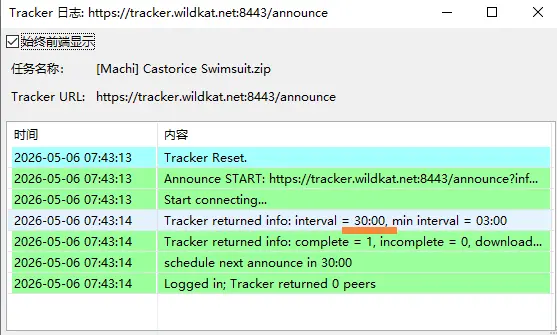
opentracker可以对每次请求随机6分钟差分,例如2小时一次就是 1:57:00~2:03:00 正负值各为3分钟,随机下发一个值返回给用户
所以此时就会很平滑,没有在出现cpu峰值情况
问题1
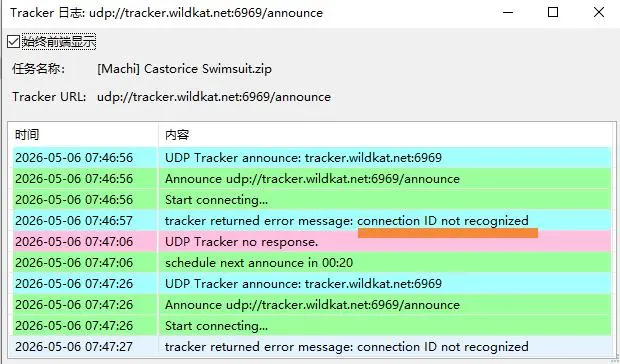
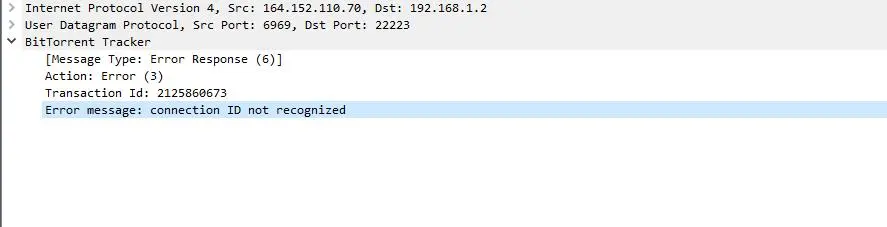
代码层bep15协议规范支持有问题,你的 udp://tracker.wildkat.net:6969/announce 服务器Transaction Id的有效期设置错误只有1分钟,导致udp连接请求判断有误,tracker服务器持续性返回给客户端`connection ID not recognized`的错误回复包,应当大于等于peer删除时间,否则你的tracker在种子客户端上永远只能首次请求,后续宣告更新时客户端无法正常使用根本连接不上,客户端只会一直在进行错误重试
A client can use a connection ID until one minute after it has received it. Trackers should accept the connection ID until two minutes after it has been send.
Confirmed in tracker_server.py:
UDP connection ID TTL is 120 seconds
_UDP_CONN_TTL = 120 at tracker_server.py (line 19467)
Connection IDs are generated in _gen_connection_id() and stored with expiry timestamp
tracker_server.py (line 19476)
Purge loop runs every 30s and removes expired IDs
tracker_server.py (line 19498)
Validation currently checks only presence in bucket (cid in bucket)
tracker_server.py (line 19506)
On invalid CID, server returns connection ID not recognized
tracker_server.py (line 19864)
So it is not 60s; it is 120s, which aligns with common BEP-15 behavior.
Thanks, i'll have to do more testing. I develop tracker to be protocol compliant. I don't think the clients are compliant with spec.
I do analysis. Top offender is BitComet from users.
I try again with bitcomet and I cannot replicate the connection invalid scenario with any endpoint I use. This could be china interrupt the handshake.
I did already.
This client is very buggy in my opinion. If a server ever restarts and client is running it would always go into error mode forever (until client program restart).
Only way to support this client accurately is to accept any CID it sends as it never processes any sort of rejection informing it to re-connect and get a valid and new CID.
I create lax option using similar to opentracker epoch mode it uses. As long as server sees a valid connection from bitcomet it will work for 48hrs after that doesn't work unless they reconnect (which appears to be restart program).
Even though I restart tracker there is a ton of bitcomet connecting and they will not fix themselves unless client restart.
Or need to make explicit rule for peer_id -BC (BitComet) and blindly accept any CID they use. Is crazy to me.
I submit a bug report to bitcomet, it should not behave the way it does. It is very easy to get stuck in orphan scenario.
I updated my code to go back to original strict method but now on a valid UDP announce or scrape from a client that I have on record of a valid connect with CID I increase that cid by min interval *2. So bitcomet can start the program and start a torrent, it will do a connect and each announce or scrape from then then on refreshes the CID by an hour. If they stop the torrent and over an hour passes and try to start the torrent without restarting the program it will fail. I cannot keep CID indefinitely. This is a design flaw (in my opinion) in bitcomet. Also if tracker is restarted all CIDS from bitcomet will be invalid unless program is restart. Only way to solve that is to store CIDS indefinitely in DB.
Bitcomet is amplifying the torrent traffic by a lot because of this design. On fail it requery on short timer over and over. It expects to be able to use the same CID forever as long as the program is open. This just isn't the design of the protocol.
Is strange they didn't address the issue when you mention it then.
My report is at https://cometforums.com/ however it is in "pending state" so maybe no one ever sees it. As stated in a follow up email I have addressed the issue by updating CID lifespan when it sees an announce/scrape. Is strange to me that such a huge issue is not found or corrected.
Yes, I am quite aware of poor udp performance. I am not draining the UDP queue fast enough. Https is replying fine. As I mention before this is a completely new tracker written from scratch.
Its frustrating for me, believe me in that 🙂
Back when it was around 120,000 torrents everything was fine and udp reply in 50ms.
On a good note I found what feature was causing the performance to tank. UDP is now fine. All packets are being processed fine.
Thu May 7 13:12:51 EDT 2026
Response Time: 40.47 ms (Excellent)
Thu May 7 13:12:56 EDT 2026
Response Time: 40.59 ms (Excellent)
Thu May 7 13:13:01 EDT 2026
Response Time: 36.48 ms (Excellent)
Thu May 7 13:13:07 EDT 2026
Response Time: 40.63 ms (Excellent)
On a bad note a major feature is now disabled 🙁
As I mention before the server is much more than just a tracker, tracker part is simple, just everything else piled on top of it. Core logic of tracker server really hasn't changed in months.
All fixed 🙂
Thanks for listening to my woes and highlighting the issue regarding bitcomet.
In the end it was nothing to do with kernel parameters, but simply lock contention with another feature holding up everything else. When that queue became full and not draining fast enough then udp packets were piling up.
Now the server is back to being quiet and idle.
It can be difficult to trace down where problems are occurring without adequate load and testing in sandbox no matter what I do never simulates real load.
The problems were not appearing until torrent load went over 120k.
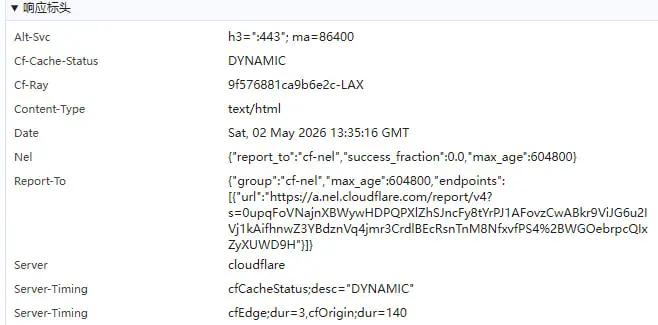
I have done no optimizations to the https endpoint so it could very likely fall over if you start routing traffic to do it. The https endpoint is not publicly advertised and I have TXT record redirecting traffic back to UDP endpoint per bep34.
dig +short TXT tracker.wildkat.net
"BITTORRENT UDP:6969 TCP:8443"
Bep34 aware clients will automatically be redirected to udp. Though I don't know if any clients actually support this feature.
@1265578519 thanks for taking the time and listening to me while sorting out UDP response issues and hi-lighting the issue with BitComet. Hopefully remains stable for the upcoming future.
I think maybe this is what you were referring to in one your optimizations?
This logic now introduce deterministic interval response +- <set amount> via cli, I choose 300. In this regard if a user has 300 torrents, they do not all reply back at same time. 25-35 min response interval.
That torrent is randomized to that value based on hash and peer id, it will stay like that until a new peer id is created. Add a new torrent and that specific torrent will a new value. I did not implement "random" for each request. It is random based on hash + peer id. Unless those values change then that is the value for that specific torrent for you.
I think its ok. It achieves the goal that person with massive amount of torrents will have unique values for each. Your trackers you have listed should be tiered anyhow. Place those both on the same tier so you are not needless query same source.



 成长值: 245
 发表于 2026/5/6 08:33
 Google Chrome 147.0.0.0
 Windows 10