设为首页收藏本站

ZMX - IT技术交流论坛 - 无限Perfect,追求梦想 - itzmx.com

 找回密码
 注册论坛

QQ登录

只需一步,快速开始

新浪微博账号登陆

只需一步,快速开始

用百度帐号登录

只需两步,快速登录

搜索
查看: 160|回复: 0

hetzner hz vps现在安装不了centos6系统了?一直找不到硬盘,加载对应的virtio_scsi.ko驱动也没用,kvm宿主机已解决 rdshell lvm

[复制链接]
 成长值: 513

签到天数: 5157 天

[LV.Master]伴坛终老

发表于 2026/2/10 06:07 | 显示全部楼层 |阅读模式 |Google Chrome 144.0.0.0|Windows 10
天涯海角搜一下: 百度 谷歌 360 搜狗 有道 雅虎 必应 即刻
hetzner hz vps现在安装不了centos6系统了?一直找不到硬盘,加载对应的virtio_scsi.ko驱动也没用,kvm宿主机已解决 rdshell lvm

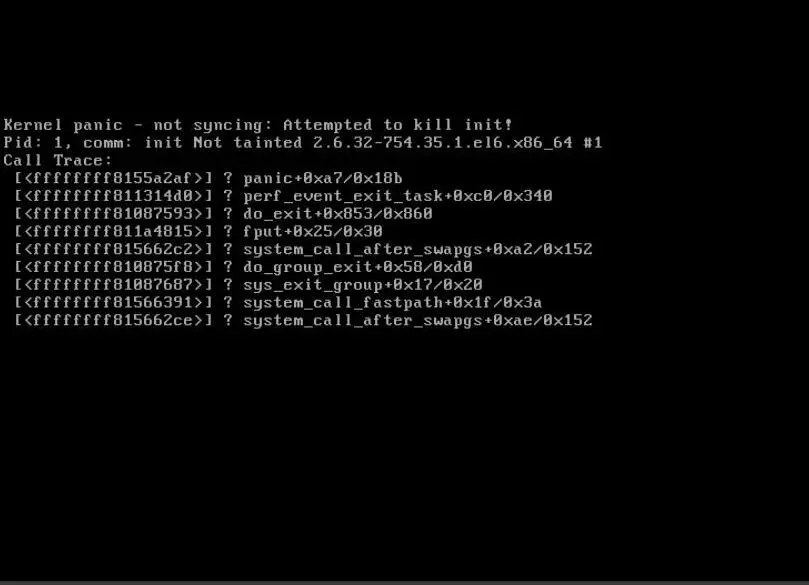
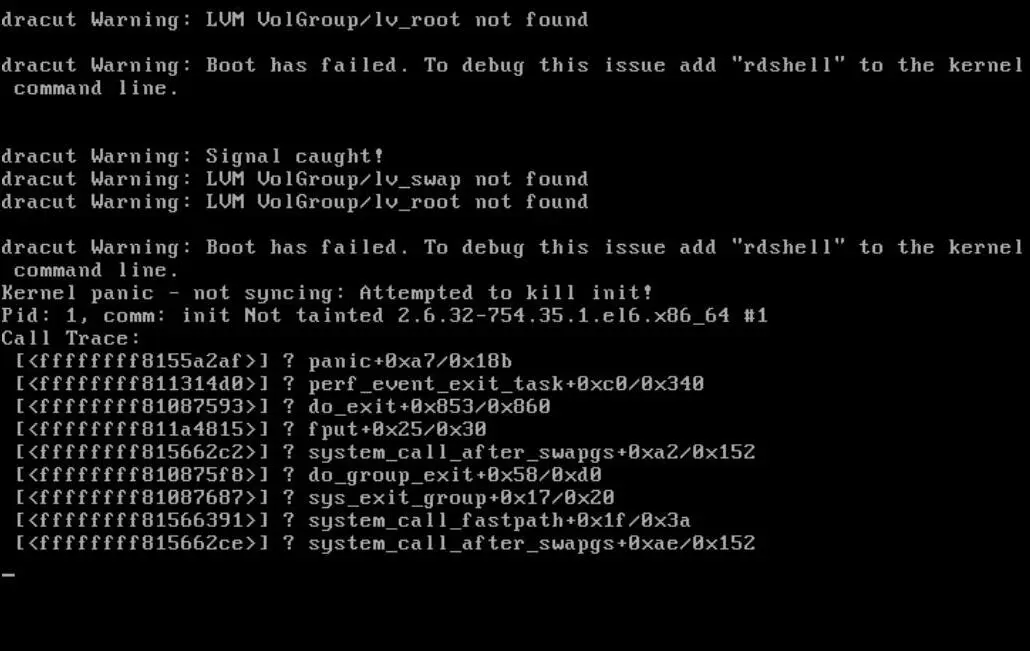
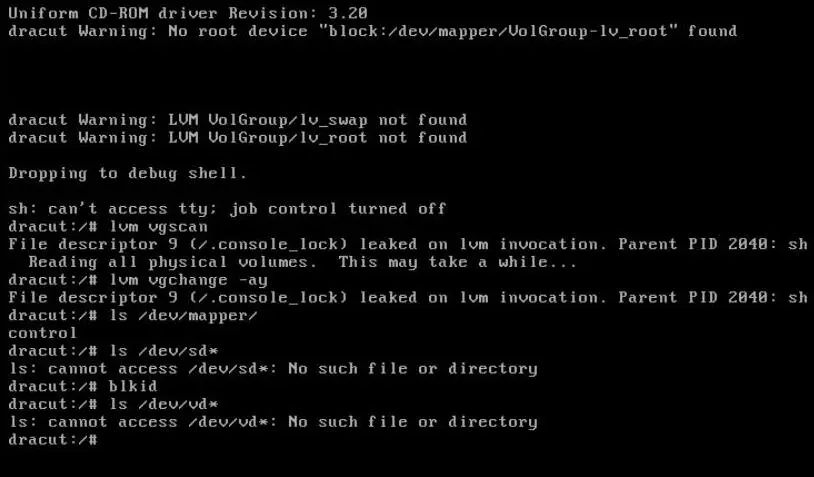
救援模式研究了好久都没搞定,判定为宿主机虚拟化问题
https://bbs.itzmx.com/thread-115465-1-1.html
001.jpg

002.jpg

003.jpg

root@rescue / # lsinitrd /boot/initramfs-2.6.32-754.35.1.el6.x86_64.img | grep virtio
-rwxr--r-- 1 root root 23888 Apr 9 2021 lib/modules/2.6.32-754.35.1.el6.x86_64/kernel/drivers/block/virtio_blk.ko
-rwxr--r-- 1 root root 29392 Apr 9 2021 lib/modules/2.6.32-754.35.1.el6.x86_64/kernel/drivers/scsi/virtio_scsi.ko
drwxr-xr-x 2 root root 0 Apr 9 2021 lib/modules/2.6.32-754.35.1.el6.x86_64/kernel/drivers/virtio
-rwxr--r-- 1 root root 15176 Apr 9 2021 lib/modules/2.6.32-754.35.1.el6.x86_64/kernel/drivers/virtio/virtio.ko
-rwxr--r-- 1 root root 21400 Apr 9 2021 lib/modules/2.6.32-754.35.1.el6.x86_64/kernel/drivers/virtio/virtio_pci.ko
-rwxr--r-- 1 root root 18304 Apr 9 2021 lib/modules/2.6.32-754.35.1.el6.x86_64/kernel/drivers/virtio/virtio_ring.ko
root@rescue / #

工单客服问一下吧,至少vultr那边,工单一下就能改引导,而且打个快照永久有效不用后续麻烦客服,虽然当时改的不是磁盘控制器依旧没装上centos6,但是理论差不多,无非工作人员改一下虚拟机配置文件的事情
https://bbs.itzmx.com/thread-110781-1-1.html

Request to change Disk Controller type for Legacy CentOS 6 compatibility

I am migrating a legacy CentOS 6.10 (Kernel 2.6.32-754.35.1.el6.x86_64) system to your platform. The system is currently stuck at boot with a "Kernel Panic - not syncing: Attempted to kill init!" error because it cannot find the root LVM device.

I have already performed the following troubleshooting in Rescue Mode:
Injected virtio, virtio_pci, and virtio_blk drivers into the initramfs.
Verified that even when manually loading these modules via insmod in the dracut emergency shell, the system still cannot see any disk devices under /dev/sd* or /dev/vd*.
It appears the legacy kernel is incompatible with the default VirtIO-SCSI controller or the modern VirtIO spec used on this host.

Could you please change the Disk Controller type for this instance from VirtIO-SCSI to Standard VirtIO mode?

Server Details:
centos-4gb-nbg1-1
cx23
#120隐藏
IP: 91.隐藏
Location: Nuremberg (NBG1)


帖子补充
等待了12小时左右收到工单回复,得到的回答居然是客服不帮关闭SCSI
Packages for our dedicated root servers and Cloud servers do not include software support. The packages also do not include support for configuring these servers. For dedicated root and Cloud servers, we only provide the hardware, network access and necessary infrastructure; and of course, we support our customers if there are any faults or disruptions. Since you are a customer of one of our dedicated root servers or Cloud servers, you are responsible for the configuration and administration of your server and for the software which runs on it.
You can find information on setups and configurations by researching these topics online. You can also search for information on Hetzner Docs ( https://docs.hetzner.com ). Our user forum ( https://forum.hetzner.com ) is also a great place to ask questions on setups, software, and configurations. Many of the active users are Germans, but also speak good English.

Kind regards
Alexander May


只能自己继续进行研究
DD了个centos7发现有一样的问题但是能解决,hetzner vps走的都是scsi,救援模式下fdisk -l /dev/sda看到Disk model: QEMU HARDDISK,已自带有sd_mod驱动,但是缺少virtio,dracut加一个就好了,centos6就无解了
centos7救援模式下chroot进入磁盘后运行,进入方法参考上方的链接
运行后会自动检测并补上2个qemu、qemu-net
  1. dracut -f -v --add-drivers "virtio virtio_pci virtio_ring virtio_net virtio_blk virtio_scsi" /boot/initramfs-3.10.0-1160.71.1.el7.x86_64.img 3.10.0-1160.71.1.el7.x86_64
复制代码

或者直接运行这行添加应该才是正确的,不过看起来两者效果一样的,两者输出的文件都相同,所以选上面那个就好了,然后centos7就正常登录系统了
  1. dracut -f -v --add "qemu qemu-net" /boot/initramfs-3.10.0-1160.71.1.el7.x86_64.img 3.10.0-1160.71.1.el7.x86_64
复制代码


centos6,反正不行,而且centos6是默认就加载全驱动的,根本不用执行dracut,只有centos7才是根据首次安装时的设备硬件加载少量驱动
  1. dracut -f -v --add-drivers "virtio virtio_pci virtio_ring virtio_net virtio_blk virtio_scsi" /boot/initramfs-2.6.32-754.35.1.el6.x86_64.img 2.6.32-754.35.1.el6.x86_64
复制代码


centos6尝试换头术的操作,centos7救援模式下压缩
  1. tar -czvf /kernel_centos7.tar.gz \
  2. /boot/vmlinuz-3.10.0-1160.71.1.el7.x86_64 \
  3. /boot/initramfs-3.10.0-1160.71.1.el7.x86_64.img \
  4. /lib/modules/3.10.0-1160.71.1.el7.x86_64/
复制代码


登录到centos6救援模式挂载解压并且使用dracut重新刷新lvm卷名,centos7默认centos-root,centos6是VolGroup-lv_root
  1. wget https://x.com/kernel_centos7.tar.gz
  2. tar -xzvf /mnt/kernel_centos7.tar.gz -C /mnt/
  3. depmod -a 3.10.0-1160.71.1.el7.x86_64
  4. dracut -f -v --add-drivers "virtio virtio_pci virtio_ring virtio_net virtio_blk virtio_scsi" /boot/initramfs-3.10.0-1160.71.1.el7.x86_64.img 3.10.0-1160.71.1.el7.x86_64
复制代码


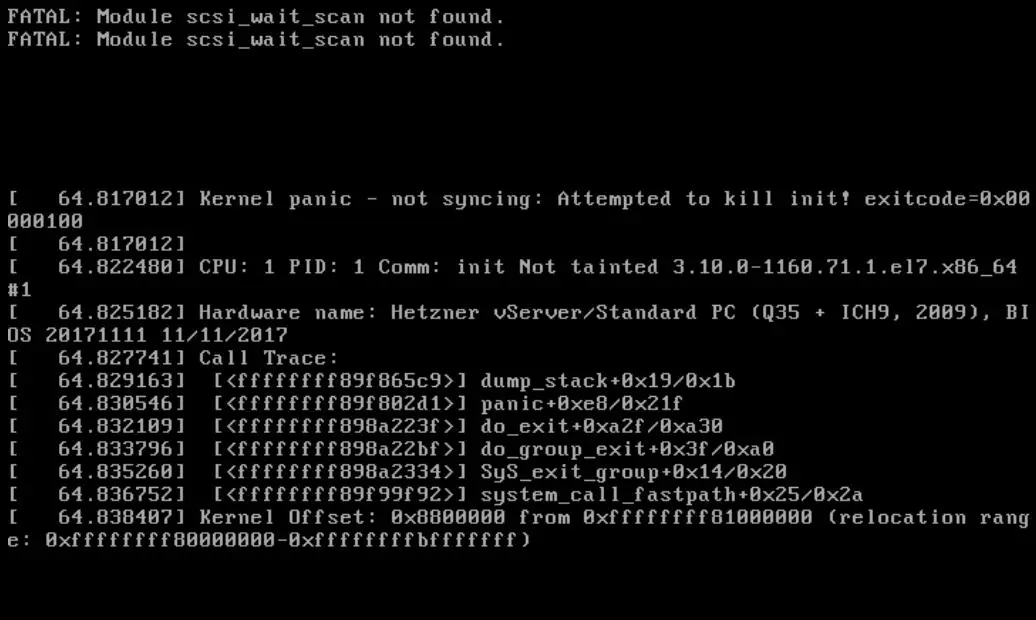
修改引导,重启服务器后最终centos6依旧失败报错
1.jpg


帖子补充
centos6启动找不到硬盘总算是解决了,就是在centos6救援模式下chroot进入磁盘后运行
  1. wget http://github.itzmx.com/1265578519/kernel/master/elrepo/kernel-lt-4.4.246-1.el6.elrepo.x86_64.rpm -O kernel-lt-4.4.246-1.el6.elrepo.x86_64.rpm
  2. rpm -ivh kernel-lt-4.4.246-1.el6.elrepo.x86_64.rpm --force
复制代码

由于elrepo提供的内核默认是不会改引导启动的,需要自己改一下,改成default=0,代表引导最新安装的内核
  1. vi /boot/grub/grub.conf
复制代码

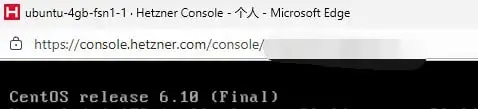
最终效果图
11115.jpg
无需管dracut,系统直接就能登录使用了,唯一的遗憾就是基于驱动层的tcp加速用不了啦,因为Linux内核版本发生了改变,tcp加速仅支持2.6.32内核,反正服务器要套cloudflare,网络传输速度已经不重要了
在hetzner能跑就行,或者选择其它服务商就没这个找不到硬盘的毛病了,也不知道以后会不会有其它的kvm宿主机的服务商升级虚拟化底层,然后工单也不管用户,那就只能换内核了,在加上elrepo也停更了,4.4内核就是极限了
对于kvm这个找不到盘符问题,网上说是1.0后,id改了,导致内核预设的文件不匹配,影响3.19之前的所有内核,centos7默认3.10内核,所以也识别不了

为什么不用新系统?
用了好多年了,很稳定从没死机过,换系统主要环境也要重新搭,就很麻烦了,新系统可能跑不起来php5,gcc版本太高什么的,编译不了等等,懒癌,时间拿去打卡不香吗
毕业后就没什么想折腾了,每天就是上班睡觉吃饭打游戏,只能挤出来打游戏的时间来学习,我去把centos6的dd包更新下,这样才能装进去
这破hz,一旦eol就给删了,现在好几家服务商只有centos10和centos9,centos10开机2G内存就没了,9的话还好
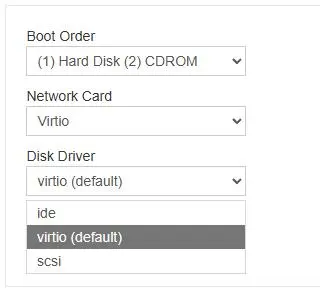
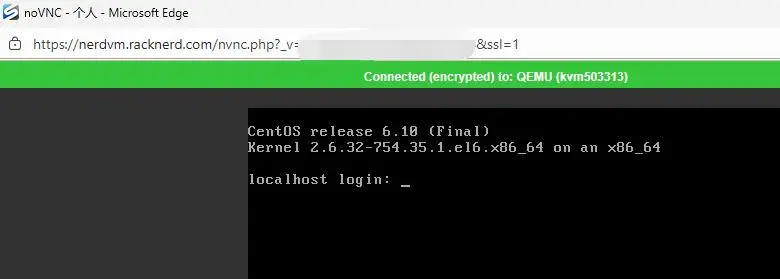
还是其它服务商好,默认virtio而不是hz那种scsi,默认virtio兼容性是完美的直接启动成功,而且用户还可以自己选择模式,根本不需要工单联系
11.jpg

12.jpg
本来准备把服务器迁移到hetzner的,但是3.49欧一个月费用还是比较贵,所以选择了racknerd年付18.66美元
https://my.racknerd.com/aff.php?aff=18367&pid=923
https://my.racknerd.com/aff.php?aff=18367&pid=924
欢迎光临IT技术交流论坛:http://bbs.itzmx.com/
回复

使用道具 举报

您需要登录后才可以回帖 登录 | 注册论坛 新浪微博账号登陆用百度帐号登录

本版积分规则

手机版|Archiver|Mail me|网站地图|IT技术交流论坛 ( 闽ICP备13013206号-7 )

GMT+8, 2026/2/16 01:02 , Processed in 0.116203 second(s), 23 queries , MemCache On.

Powered by itzmx! X3.4

© 2011- sakura

快速回复 返回顶部 返回列表